←Part of Froggy Eye Ltd · See all our apps
For iPhone, iPad and Android · No login, no account

Check your Premium Bonds. No login.

Bondbell is an independent app for checking UK Premium Bond numbers against the monthly prize lists. Save your bond ranges once. When you tap Check, it downloads NS&I's public list to your phone and compares it with your numbers there. Your bond numbers are never sent anywhere.

No login and no account Bond numbers stay on your device Unclaimed prizes search Free, with a one-time Pro purchase
Bondbell. Check your bond numbers on your phone. No login.
How it works

Save your numbers once,
then tap Check.

There is nothing to sign up for. Bondbell keeps your bond numbers on your device and only goes online when you ask it to, to fetch the public lists NS&I publishes.

01

Add your bonds

Open My bonds, add a holder, then enter the bonds as ranges or single numbers, from a statement or from old paper certificates. Spaces are fine. If a number cannot be read, Bondbell explains why in plain English.

02

Tap Check

Bondbell shows the size of the list before anything downloads. It then downloads the list straight from nsandi.com, compares it with your numbers on the device, keeps only the matches and deletes the download. You can cancel at any time.

03

Read the result

The result lists any prizes by holder, or says plainly that none of your bonds is on that month's list. Every result reminds you to confirm with NS&I, and when prizes are listed it explains how to claim them.

Why it works

A plain, private way
to check your bonds.

No login, no account

There is nothing to register and no password to remember. Your bond numbers are saved on your device and the comparison happens there.

Ranges, single numbers, old certificates

Add bonds as ranges or one at a time. Old paper certificates work too, and a holder can have as many ranges as you like.

Unclaimed prizes search

Search NS&I's list of prizes that were never claimed, which goes back to 1957. The list shows the value of each unclaimed prize, and claims are made through NS&I.

Results-day reminder

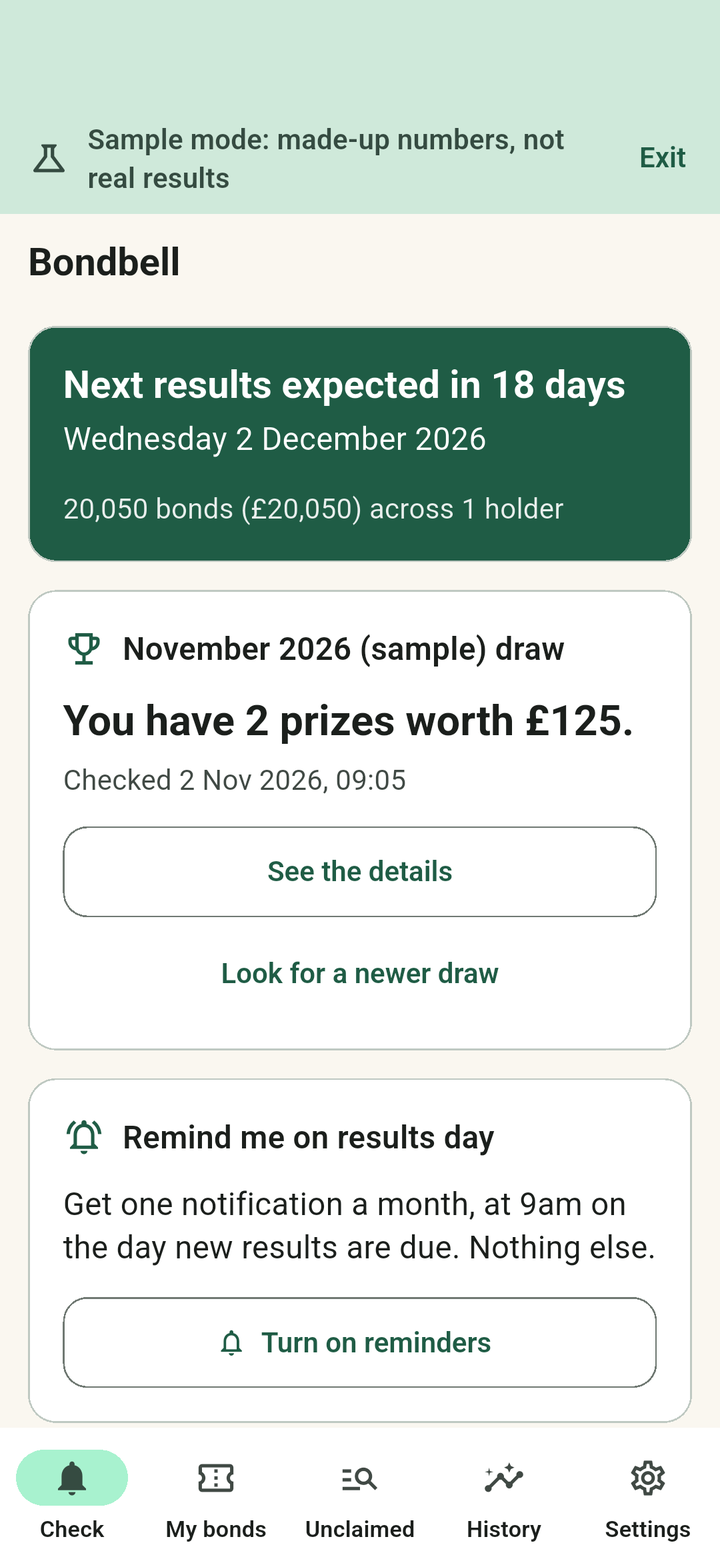
Turn on an optional reminder at 9am UK time on the day new results are expected. It tells you the new list should be available. It does not tell you whether you have a prize.

Try it with sample numbers

Sample mode runs a complete check with made-up numbers, so you can see how it works before adding your own. Sample data is clearly labelled and kept apart from your real bonds.

No ads, no tracking

No advertising, no analytics and no server of ours in the middle. Purchases are handled by the App Store or Google Play. You can delete your bonds and results from Settings at any time.

Good for

The bonds people actually need to check.

Bondbell is for anyone who would rather not log in each month, and for families sorting out bonds that have sat in a drawer for years.

📄

Bonds on a statement

Enter each range once

📜

Old paper certificates

Single numbers and short ranges

👪

A parent's or grandparent's bonds

Keep each holder separate

🔎

A relative's old bonds

Search the unclaimed list

🔔

Results day

One reminder a month, if you want it

🗓️

A month you missed

Earlier draws with Pro

📒

Your record of checks

History with Pro

🧪

Having a look first

Sample mode, nothing to enter

Help and support

Need a hand?
Write to us.

Bondbell is made by Froggy Eye Ltd, a small studio in the UK. If something is unclear or not working, email us and a person will reply.

Contact support

Email info@froggyeye.com. It helps to say which phone or tablet you use and what you were doing when the problem appeared. Please do not send your bond numbers; we never need them.

Most questions about adding bonds, checking a draw, reminders and purchases are answered in the FAQ below.

Privacy

Your bond numbers are saved on your device and are not sent to us. There is no account, no advertising and no analytics.

Read the full Bondbell privacy policy.

Independent of NS&I

Bondbell is an independent app and is not affiliated with, endorsed by or connected to NS&I (National Savings and Investments). Premium Bonds is a registered trademark of the Director of Savings. Results come from the public lists NS&I publishes; always confirm a prize with NS&I before relying on it.

Questions about a prize, a claim, or your Premium Bonds holding itself can only be answered by NS&I.

Pricing

Free to use.
Pro is one purchase.

Checking the latest draw, single-number unclaimed searches, reminders and sample mode are all free. Pro is a one-time purchase for people with more than one holder or who want to look further back. There is no subscription.

Free

Free

Everything you need to check your own bonds each month.

  • One holder, with as many ranges as you like
  • Check the latest draw
  • Unclaimed search, one number at a time
  • Results-day reminder
  • Sample mode
  • No ads, no account
Get the app

The app shows the Pro price for your own storefront before you buy. Pro is a one-time purchase, not a subscription, and there is nothing to cancel. An optional tip jar is also available; tips are a thank-you only and unlock nothing.

Why this exists

Your bond numbers
stay with you.

Checking a drawer of old certificates, or a parent's bonds as well as your own, should not need an account or a password.

Bondbell does one job. It keeps your bond numbers on your device, fetches the public lists NS&I publishes when you tap Check, and tells you plainly what it found. It is an independent app, not affiliated with NS&I, so every result asks you to confirm with NS&I before relying on it.

0

Logins, accounts, ads and trackers. Your bond numbers are saved on your device and are never sent anywhere.

1957

How far back NS&I's list of unclaimed prizes goes. Search it by bond number.

9am

UK time on results day: the optional reminder that the new list should be available. It does not tell you whether you have a prize.
FAQ

The basics.

Is Bondbell connected to NS&I?

Bondbell is an independent app and is not affiliated with, endorsed by or connected to NS&I (National Savings and Investments). Premium Bonds is a registered trademark of the Director of Savings. Results come from the public lists NS&I publishes; always confirm a prize with NS&I before relying on it.

How do I add my bonds?

Open My bonds, add a holder, then add each block of bonds as a range (first and last number) or as a single number. You will find the numbers on a statement or on old paper certificates. Spaces and separators are fine.

What does a bond number look like?

Two letters followed by six digits, usually with up to three digits in front, in the pattern 123AB456789 (a made-up example). The oldest bonds have no digits in front. The letters I, O and U are not used, so Bondbell will ask whether you meant 1 or 0. A range has to stay within one series: the same leading digits and letters.

Why does Bondbell say my number cannot be read?

The most common reason is that a holder's number has been typed instead of a bond number. The message says what is wrong, such as too many digits or a letter that is never used.

Does Bondbell check automatically?

No. A check runs only when you tap Check. The optional reminder tells you when a new list should be available; you then open the app and check when it suits you.

What does the reminder tell me?

Only that new results are expected that day, at 9am UK time. It is one notification a month and it does not know or say whether you have a prize. Turn it on or off on the Check tab or in Settings. Bondbell asks for notification permission only when you turn it on.

How do I check an earlier month?

The latest draw is free. With Pro you can check any of the months NS&I currently publishes, usually about six.

How do I search for unclaimed prizes?

Open the Unclaimed tab and enter a bond number. Bondbell searches NS&I's list of prizes that were never claimed and shows the value of any match. With Pro you can search all your saved bonds at once. Claims are made through NS&I.

A prize is listed. What do I do now?

Confirm it with NS&I. The result screen explains how prizes are normally paid and links to NS&I's own contact page and prize checker. Bondbell cannot pay, claim or confirm a prize.

Where are my bond numbers kept?

On your device. They are not sent to us or to NS&I. When you check, your device connects directly to nsandi.com to download the public list, and the comparison happens on the device. The privacy policy has the full detail.

How do I delete my data?

Delete a single holder or range in My bonds, or use Delete all my data in Settings. Uninstalling the app also removes it.

What does Pro add, and is it a subscription?

Pro is a one-time purchase, not a subscription. It adds unlimited holders, earlier draws, an unclaimed search across all your saved bonds, and history. The app shows the price for your storefront before you buy.

I bought Pro. How do I get it back on a new device?

Use Restore purchases on the Pro screen or in Settings, signed in to the same App Store or Google Play account you bought it with.

What is the tip jar?

An optional way to say thank you. Tips unlock nothing and are never needed to use the app.

How do I get help?

Email info@froggyeye.com and tell us which device you use and what happened. Please do not send your bond numbers; we never need them.

Save your numbers once. Check when you like.

Bondbell is free to download, with a one-time Pro purchase. No login, no account, no ads, and your bond numbers stay on your phone.

More from Froggy Eye Ltd